
In recent years, cloud data architectures have evolved significantly. Where we once had a succession of specialized tools — ETL, Data Warehouse, analytical engines — modern platforms aim to unify these use cases around a common foundation.
In the Azure ecosystem, Databricks has become a central component of many data architectures, especially for use cases requiring scalability, distributed processing, and real-time capabilities.
For a cloud developer or architect already familiar with Azure, Databricks can still feel confusing, as it was originally a standalone platform that is now accessible within Azure.
The goal of this article is to explain what Databricks is, how it works technically, and how it fits into an Azure architecture, starting from the basics all the way to the concrete organization of projects.

Databricks is an analytics platform designed to address modern data challenges: large volumes, real-time processing, diverse use cases (BI, data engineering, data science), and governance requirements.
Unlike traditional architectures where each use case relied on a dedicated tool (ETL, DWH, ML platform), Databricks proposes a unified approach based on the concept of the Lakehouse.
The idea is simple: use a Data Lake as a single storage layer while providing the guarantees typically associated with Data Warehouses: transactions, performance, and control.
This approach allows to:
Databricks is therefore neither just a Spark engine nor a Data Warehouse: it is a computing and governance platform positioned at the core of the data architecture.
For an Azure architect, the question naturally arises. Both platforms share a similar vision — centralizing data use cases — but with different philosophies. Fabric is a 100% Microsoft solution, designed for organizations already invested in the Azure/Power BI ecosystem, with a more accessible and no-code approach. Databricks is an open, multi-cloud platform (Azure, AWS, GCP), built for advanced technical needs: large-scale distributed processing, MLOps, and cluster flexibility.
In short: Fabric for simplicity and Microsoft integration, Databricks for power and openness.
Databricks architecture is based on a clear separation between:
Data never leaves your cloud environment. Databricks orchestrates computation, but storage and security remain under your control (in our case, within Azure).
The compute engine is distributed: a driver coordinates execution and delegates processing to multiple executors, enabling massive parallelization of workloads, whether batch or streaming.
As mentioned earlier, Databricks does not store data itself: it relies on an object-based Data Lake provided by the cloud.
In Azure, this is typically Azure Data Lake Storage Gen2.
Databricks is format-agnostic and can read and write most existing file types.
This allows to:
It is worth noting that the Delta Lake format is recommended as a Databricks best practice. It guarantees ACID transactions, which can be highly desirable in a data project.
One of the key success factors for a Databricks project is the organization of the workspace and the code.
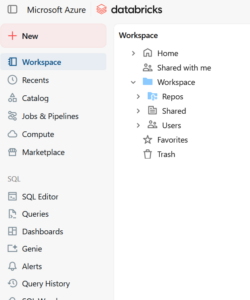
A Databricks workspace is typically organized by:
Each domain contains:
Bronze / Silver / Gold,
The Databricks workspace is not a Git repository, but an execution and collaboration environment.
Even though Databricks is heavily notebook-oriented, mature projects quickly adopt a clear separation with three main layers.
This approach enables standard code reviews, automated deployments, and better maintainability.
Environment management
Environment separation (dev, test, prod) is a classic best practice, but its concrete implementation in Databricks deserves clarification. The most common approach is to separate environments by distinct Azure workspaces, ensuring full isolation of resources, permissions, and configurations. Each workspace can then be structured into separate Unity Catalog catalogs, providing an additional logical boundary if needed.
Parameters (paths, secrets, configs) can be externalized, for example injected via environment variables or through Azure Key Vault. The code therefore remains identical, only the execution context changes.
Databricks includes its own orchestration engine:
Each task can:
Databricks therefore acts as a data orchestrator, complementing global cloud orchestrators.
In Azure, Databricks is provided as a managed service: Azure Databricks, fully integrated with the Microsoft Azure ecosystem (and its billing system).
Authentication relies on Entra ID:
Access to the Data Lake is handled via Managed Identity, eliminating any need to manage keys in the code. To allow Databricks to access other Azure resources using this mechanism, a dedicated component is required: Access Connector for Azure Databricks.

Unity Catalog is the centralized governance layer of Databricks. It allows fine-grained access control at all levels: catalogs, databases, tables, columns, and even rows. In practice, it provides a single control point to define who can read, modify, or query which data — independently of the cluster or notebook used.
Beyond permissions, Unity Catalog also provides automatic data lineage, audit logs, and the ability to share data across workspaces or with external partners via Delta Sharing. It is therefore the foundation of trust for the platform’s data governance.
Databricks naturally integrates into an Azure architecture. We can list:
Ingestion: Event Hub and APIs Databricks integrates natively with Azure Event Hub for real-time data ingestion (application logs, IoT data, business events). For batch scenarios, it can also call external REST APIs or process files stored in ADLS. This flexibility allows it to support both streaming architectures and traditional ingestion pipelines.
Global orchestration: Azure Data Factory Databricks does not always operate alone. In an existing Azure architecture, Azure Data Factory often acts as the global orchestrator: triggering Databricks jobs, chaining them with other services (SQL, Synapse, APIs), and managing dependencies between processes. Databricks includes its own workflows for internal orchestration, but ADF remains relevant for cross-service coordination.
Data exposure: Power BI Once data has been transformed and stored in Gold layers, it can be directly exposed to Power BI via a native Databricks connector or through tables published in Unity Catalog. This integration allows BI teams to query fresh data without duplication into an intermediate Data Warehouse.
CI/CD: Azure DevOps and Terraform Industrializing Databricks projects requires a robust CI/CD pipeline. Azure DevOps allows versioning of notebooks and Python packages, execution of automated tests, and deployment of jobs across environments. Terraform is used to provision Databricks infrastructure itself (workspaces, clusters, Unity Catalog permissions) in a reproducible and auditable way.
Databricks provides a modern answer to complex data architectures by combining: distributed computing, unified storage, advanced governance, and native Azure integration.
When used properly, it can become the central foundation for your future cloud data projects; poorly structured, it can quickly turn into a jungle of notebooks.
The key therefore lies as much in the technology as in the organization of projects and code.
