
In a development project, some rules are easy to understand but also easy to forget. This is often the case with commit message conventions.
For example, when a team works with Azure DevOps, it is useful to link each commit to a task, bug, or user story. This provides a clear connection between the initial requirement, the modified code, and the Git history. However, in practice, it is easy to forget to add the task ID to the commit message. As a result, the history becomes less readable, pull requests lose context, and the team has a harder time finding the link between Azure DevOps and the code. To avoid these oversights, this rule can be automated with a Git Hook.
In this article, we will therefore see how to implement a Git Hook through a concrete use case: automatically retrieving an Azure DevOps task ID from the branch name, then adding it to the commit message.
A Git Hook is a script that Git automatically runs at a specific point in the workflow.
For example, Git can run a hook before a commit, while preparing the commit message, before a push, or after certain Git actions. Thanks to this mechanism, a team can automate a rule without relying solely on each developer’s vigilance. A Git Hook can notably be used to:
Within a team, Git Hooks become particularly useful when you want to enforce common conventions. A convention written in a README remains useful, but it still relies on a manual action. A developer can therefore forget it, apply it differently, or bypass it out of habit. With a Git Hook, the convention is integrated directly into the Git workflow. This means the developer no longer needs to think about it for every action.
The goal is not to add an unnecessary constraint. On the contrary, the hook removes a repetitive action and makes the project history more reliable. In our case, the Git Hook will automate a simple rule: adding an Azure DevOps task ID to the commit message.
In Azure DevOps, teams generally track development through work items: tasks, bugs, user stories, or features. When a commit contains a reference to a task, the team can more easily understand why a change was made. In concrete terms, this link makes it possible to:
However, this link often relies on a manual action. For example, a developer might write a commit message like this: Fix customer mapping
This message remains understandable, but it is missing an important piece of information: the ID of the associated task. The goal is therefore to automatically obtain a message like this: #1234 Fix customer mapping. Here, #1234 corresponds to the Azure DevOps task ID.
To avoid entering this ID for every commit, it can be retrieved directly from the branch name. For example: feature/add-customer-validation#1234
In this branch name, the hook extracts the number after the #. It therefore retrieves: 1234. It then automatically adds this reference to the beginning of the commit message.
The principle remains simple: Branch name → ID extraction → addition to the commit message
This way, the developer continues to write the commit message normally. The hook takes care of adding the task reference. This approach reduces oversights, standardizes commit messages, and improves project traceability.
For this requirement, I use the prepare-commit-msg Git Hook.
Git runs this hook when it prepares the commit message. It is therefore particularly well suited when you want to automatically modify the message before finalizing the commit.
In my case, the script follows this logic:
# character#<ID> to the beginning of the commit message
Here is the script used:
#!/bin/sh
MSG_FILE="$1"
# Branche courante
BRANCH="$(git rev-parse --abbrev-ref HEAD 2>/dev/null)"
# Extrait le nombre après un # (ex: a/b/c/d#123 => 123)
ID="$(printf "%s" "$BRANCH" | sed -n 's/.*#\([0-9][0-9]*\).*/\1/p')"
# Si pas d'ID, on ne fait rien
[ -z "$ID" ] && exit 0
# Première ligne du message
FIRST_LINE="$(sed -n '1p' "$MSG_FILE")"
# Si déjà préfixé, ne rien faire
printf "%s" "$FIRST_LINE" | grep -q "^#$ID\b" && exit 0
# Préfixe le message (en gardant le reste)
TMP_FILE="${MSG_FILE}.tmp"
{
    printf "#%s %s\n" "$ID" "$FIRST_LINE"
    sed -n '2,$p' "$MSG_FILE"
} > "$TMP_FILE" && mv "$TMP_FILE" "$MSG_FILE"
exit 0
The way it works is intentionally simple.
First, the script retrieves the file containing the commit message: MSG_FILE="$1"
Git automatically passes this file to the hook.
Next, the script retrieves the current branch name: BRANCH="$(git rev-parse --abbrev-ref HEAD 2>/dev/null)"
It then looks for a number placed after a #: ID="$(printf "%s" "$BRANCH" | sed -n 's/.*#\([0-9][0-9]*\).*/\1/p')"
If the branch name does not contain an ID, the hook stops without modifying the commit: [ -z "$ID" ] && exit 0
This way, the script does not block branches that do not follow this convention.
The script then reads the first line of the commit message: FIRST_LINE="$(sed -n '1p' "$MSG_FILE")"
Before modifying the message, it checks that this line does not already contain the expected prefix: printf "%s" "$FIRST_LINE" | grep -q "^#$ID\b" && exit 0
This check prevents a message such as: #1234 #1234 Fix customer mapping
Finally, the script rewrites the message by adding the ID to the beginning of the first line: printf "#%s %s\n" "$ID" "$FIRST_LINE"
By default, Git uses the following folder to store hooks: .git/hooks. You can therefore place the script here: .git/hooks/prepare-commit-msg. However, this solution quickly shows its limitations because Git does not version the .git/hooks folder. In other words, each developer would have to manually copy the script onto their workstation.
To share the hook with the entire team, it is better to create a versioned folder in the repository: .githooks/. The hook can then be placed in this folder: .githooks/prepare-commit-msg. Each developer then configures Git to use this folder: git config core.hooksPath .githooks.
On Linux or macOS, it may also be necessary to make the script executable: chmod +x .githooks/prepare-commit-msg
To make adoption easier, it is preferable to document these commands in the project’s README. Finally, one limitation should be kept in mind: a Git Hook remains local to the developer’s workstation. A developer may therefore not have configured it, or may bypass it. If the team wants to make this rule mandatory, this approach should be complemented with a check in a pull request or in an Azure DevOps pipeline.
The benefit is not limited to the commit message. Once the commit is pushed to Azure DevOps, the task reference also improves traceability and navigation within the tool, as illustrated in the example below.
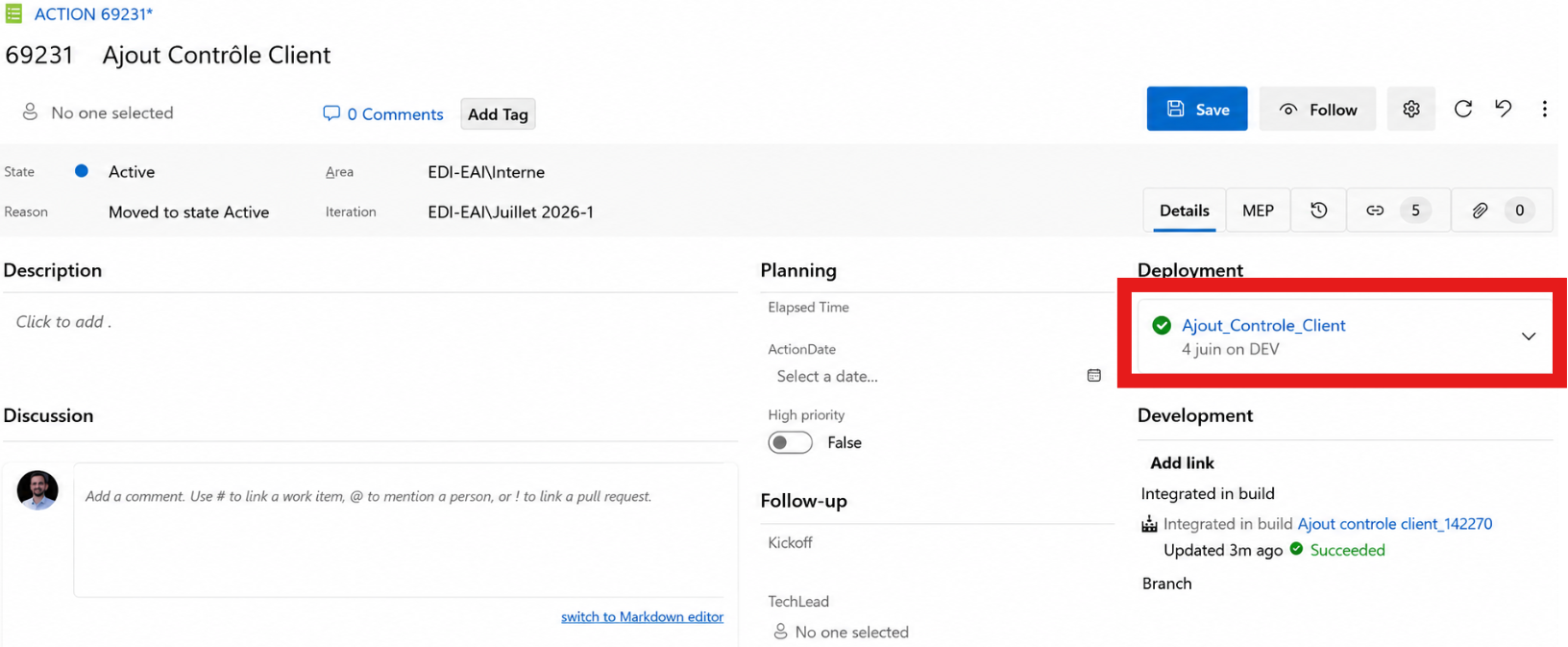
From an Azure DevOps task, it becomes easy to find the associated commits, as well as the releases triggered from those changes. This provides a more complete view of the work performed: the task description specifies the functional requirement, the commits detail the changes made to the code, and the releases make it possible to track their impact all the way through deployment.
The traceability is particularly useful for securing a production deployment, identifying precisely which changes were deployed, or facilitating a rollback in case of an issue.
This link therefore provides real value within Azure DevOps:
For example, if an issue reappears several weeks later, it becomes easier to start from the Azure DevOps task and then find the related commits. Conversely, from the Git history, the task ID makes it possible to quickly return to the initial requirement.
The Git Hook therefore acts as a bridge between two levels of information: project tracking in Azure DevOps and technical history in Git.
Implementing a Git Hook makes it easy to automate a convention within a Git project.
In this example, the hook retrieves an Azure DevOps task ID from the branch name and automatically adds it to the commit message. This means the developer no longer needs to manually enter this reference for every commit. The risk of forgetting it is reduced, messages become more consistent, and the Git history becomes easier to read. In addition, this automation improves the workflow without making it more complex.
Of course, a Git Hook does not replace a server-side validation rule if the rule needs to be mandatory. However, it provides a simple and effective first step toward standardizing a team’s practices. Once this first hook is in place, the same logic can be applied to other needs: checking commit message formats, running checks before a commit, or making everyday Git conventions more reliable.
